# Questshock ![questshock](res/logo_small.png) An open source project to play the classic 1994 System Shock on a VR headset, built on top of [Shockolate](https://github.com/Interrupt/systemshock), a cross-platform port of the original game. The game is played on a virtual screen: the engine renders its usual flat 2D frame, and Questshock shows it as a large screen floating in front of you in VR. It is not a stereoscopic 3D conversion; you sit or stand in front of the screen the way you would in front of a monitor or a cinema screen. The screen's width and distance can be set separately for the menus/intro and for gameplay. Both controllers act as laser pointers for the game's mouse-driven interface and for a VR menu and on-screen keyboard, and every controller button, stick direction and game hotkey can be assigned to a game action. Questshock runs entirely on the headset (tested on a Meta Quest 2) as a sideloaded Android app, and needs your own copy of the game data. > **Unofficial fan project.** Questshock is not affiliated with, endorsed by or > supported by the rights holders of System Shock. It contains no game data: you > need your own copy of System Shock: Enhanced Edition. ## Screenshots
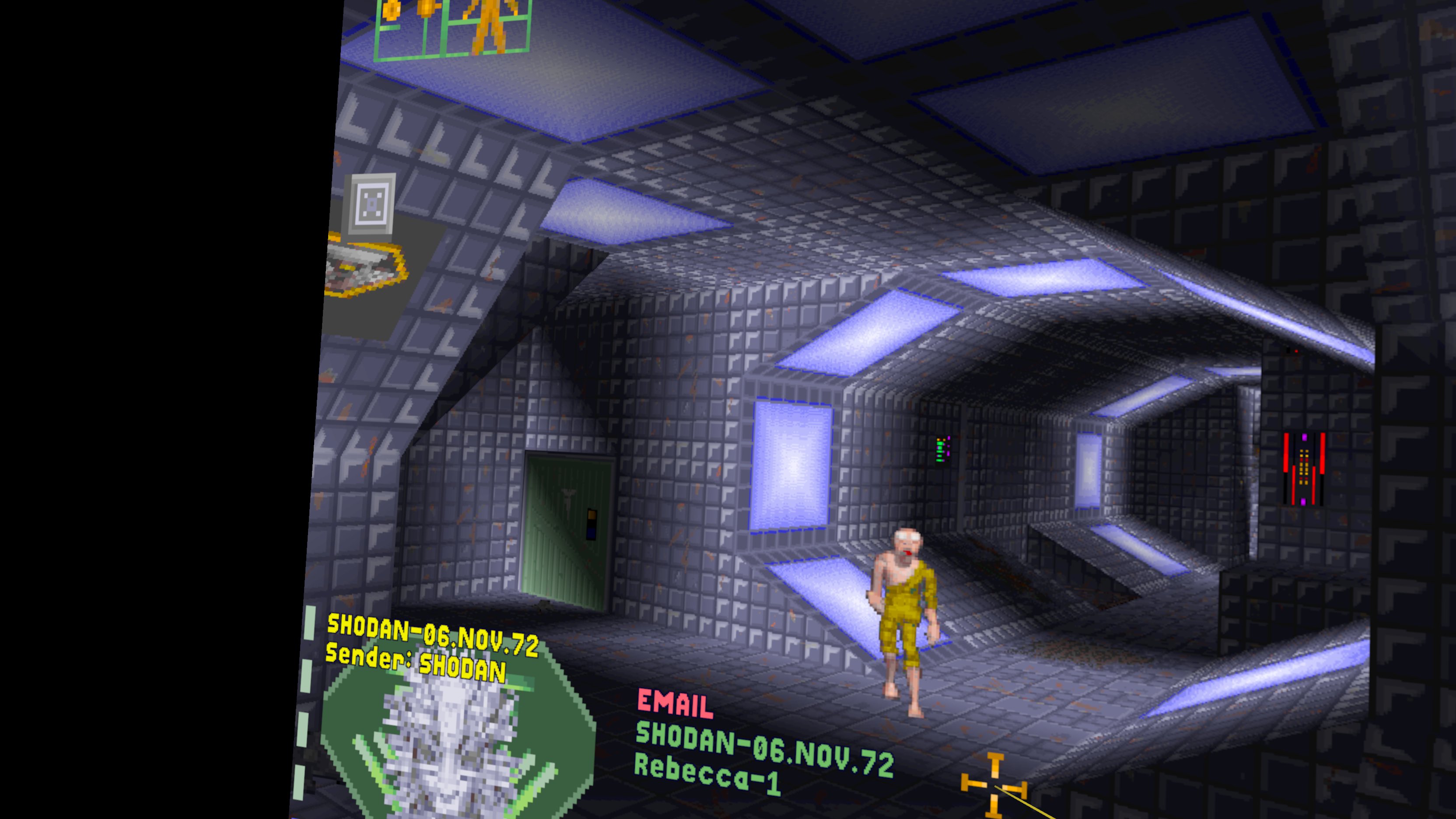
Exploring the station on the virtual screen
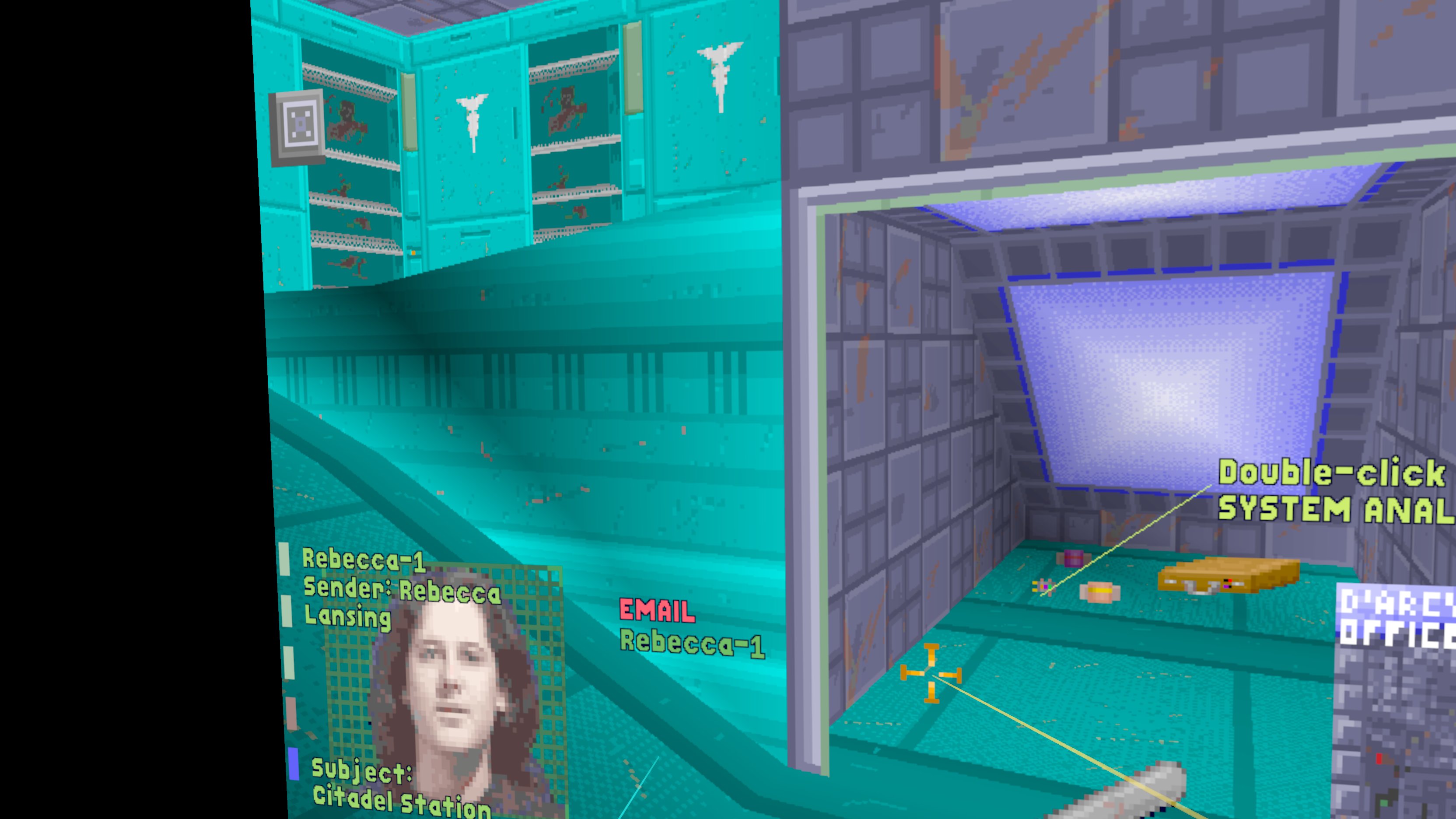
Reading an email - the laser pointer clicks like a mouse
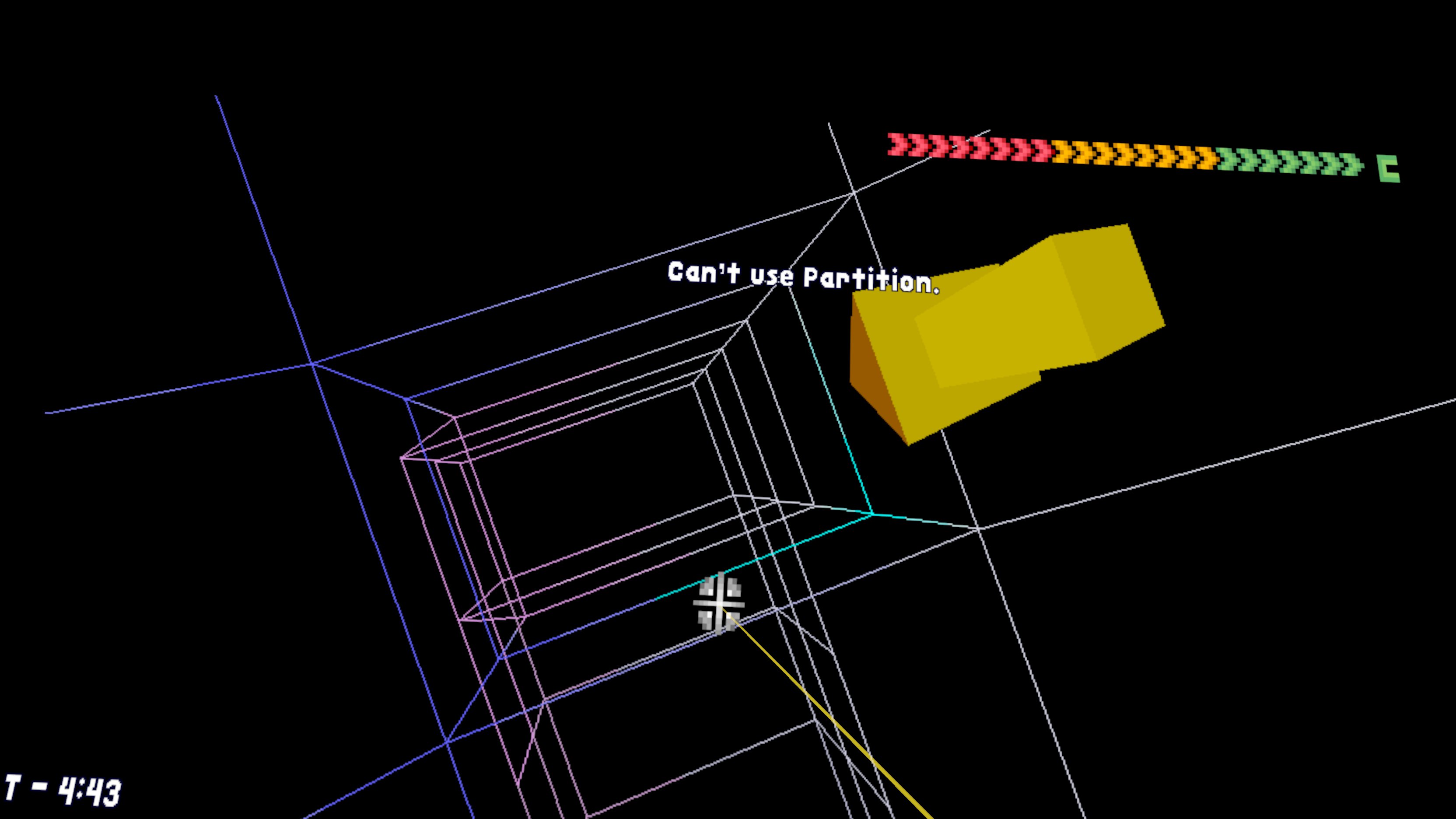
Cyberspace
Cyberspace
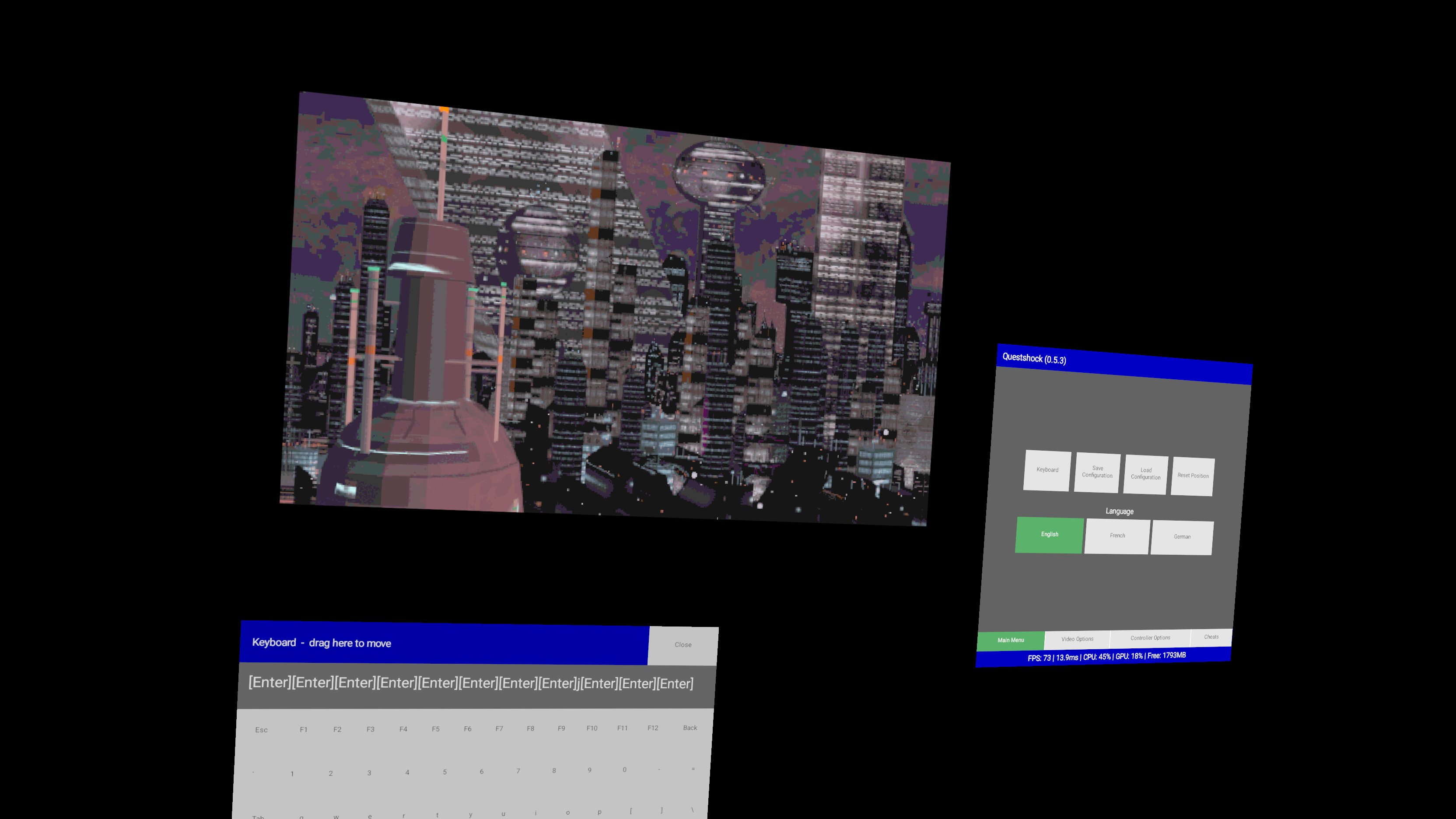
The game screen, the menu and the keyboard float independently
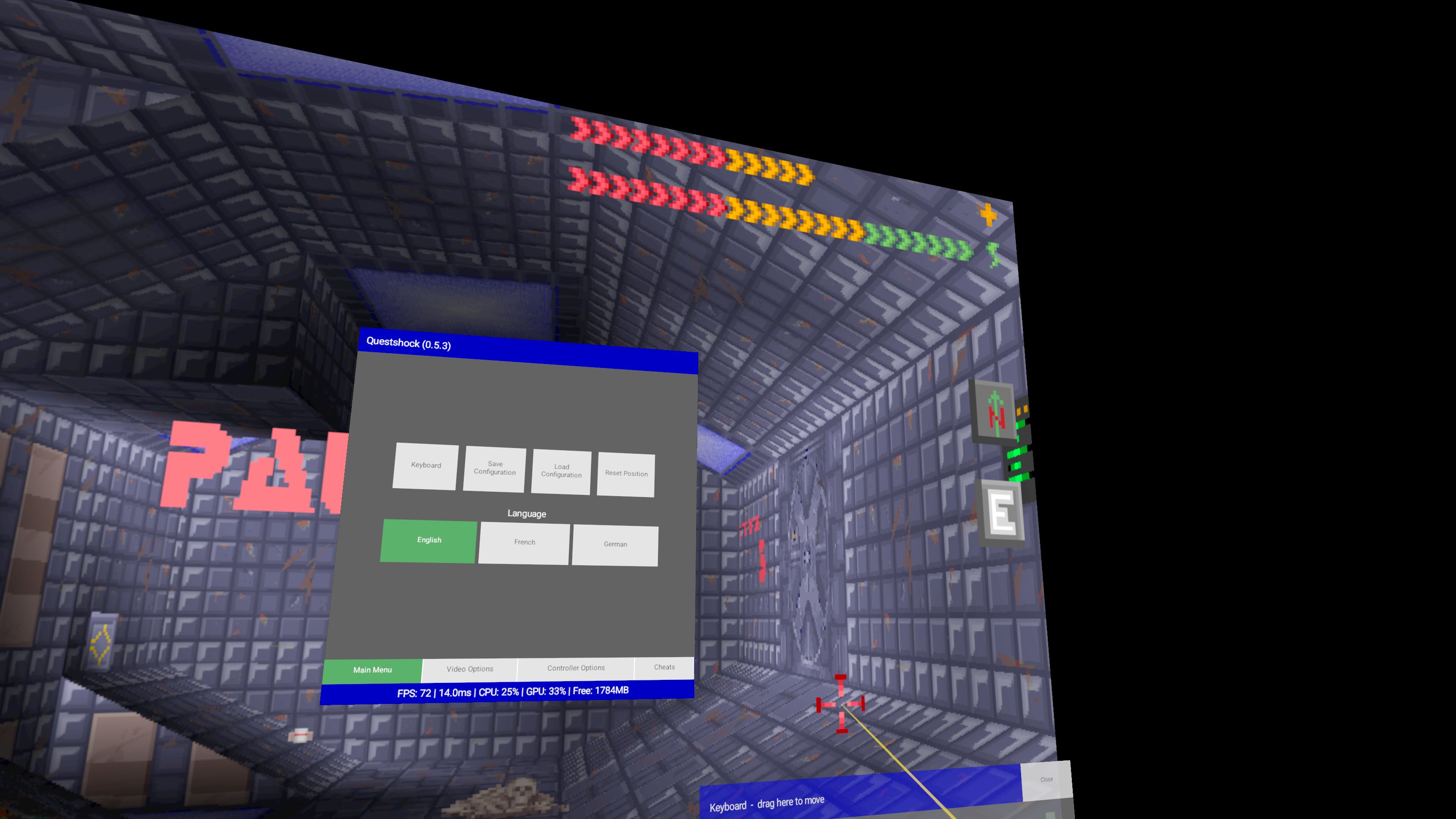
The VR menu
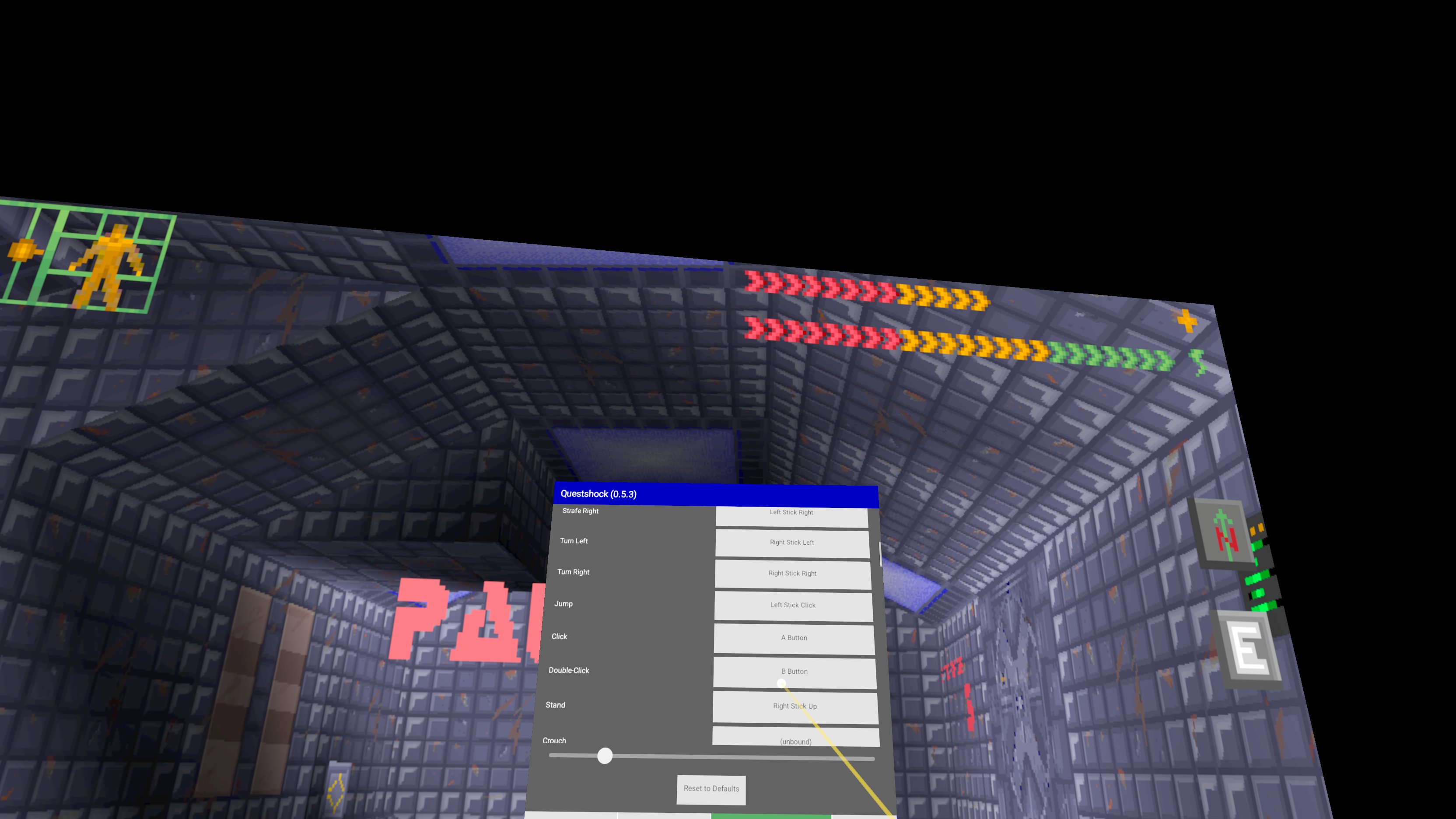
The VR menu
Assigning controller inputs to game actions
[A short video](res/screenshots/questshock_v0.5.3_010.mp4) shows the game in use. ## Quick start You need a Meta Quest (tested on a Quest 2) and your own copy of the game data. 1. Get **System Shock: Enhanced Edition** (for example from [gog.com](https://www.gog.com/)); see "3. Game assets" below. 2. Download `questshock--android-arm64.apk` from the repository's Releases page and sideload it onto the headset with [SideQuest](https://sidequestvr.com/) or `adb install`. 3. Launch it once. It creates `/sdcard/QuestShock/`. Copy your game's `res/data/` and `res/sound/` folders into `/sdcard/QuestShock/res/`. 4. Launch it again. The left controller's menu button opens the menu; the default controls are in "5.1.1. Menu, controls and cheats" below. Section "5.1. Installing and playing" has the details. ## 1. Design principles - **Standalone-headset-only.** The game must run entirely on the headset itself - no PC required, whether tethered or streamed (not PCVR). Any feature or dependency that assumes a host PC is out of scope. - **OpenXR-first.** Favor OpenXR-standard APIs over vendor-specific ones (e.g. Meta's Oculus Mobile SDK) wherever there's a choice, so the port isn't locked to Meta Quest and can work across other standalone, Android-based OpenXR headsets (e.g. Pico) too. ## 2. Layout - `engine/` - a vendored snapshot of the Shockolate engine source. Built via Docker; see "4. Desktop build" below. `engine-patches/` holds general (not Android-specific) fixes applied to a scratch copy at build time - same convention as `android/engine-patches/` below, but for the Linux/Windows desktop builds; `engine/` itself is never modified. See "4.4. Engine patch reference" below for what each one does. - `build-image/` - the Dockerfile (and supporting scripts) for the engine build environment. Every third-party dependency the engine needs to compile (SDL2, SDL2_mixer, the fluidsynth-lite MIDI synth, a MIDI soundfont) is fetched and built once into this image - compiling `engine/` itself needs no network access. - `build-image.sh` / `run-image.sh` / `upload-image.sh` - build the image, run it to compile the engine, and push it to a registry, respectively. - `res/assets/` - where you place your own purchased copy of the game (see "3. Game assets" below); `res/assets/extract_assets.sh` extracts it into `ss_ee/`. - `res/run.sh` / `res/run.bat` - the launcher scripts, copied into `dist`/`dist-win` on build. `res/run-mods.sh` / `res/run-mods.bat` are companion launchers that additionally load every mod built under the `modding/` subproject's own `dist/mods/` (see [modding/README.md](modding/README.md) section 4.3) - copied into `dist`/`dist-win` the same way, but not into the redistributable `package`/`package-win` archives, since that build output is local and git-ignored. - `res/questshock.config.default.json` - the bundled default configuration (see [CONFIG.md](CONFIG.md)); `res/controller_profiles/` - the per-controller illustrations and labels shown in the Controller Options tab (see [CONFIG.md](CONFIG.md)). Both are copied into the APK, as is `res/splash.png`, the startup splash image. `res/logo.png` is the 1024x1024 logo, the master of the launcher icon (`android/app/src/main/res/mipmap-*/ic_launcher.png` are scaled copies of it) and the image to use for store listings; `res/logo_small.png` is the copy shown at the top of this file. - `Makefile` - targets: - `all` (default) - alias for `dist`. - `build-image` - builds the Docker build-image (`./build-image.sh`). Only needed once, or after `build-image/` changes. - `engine` - compiles `engine/` (the vendored Shockolate snapshot) via the build-image, offline. Always re-run by the targets below, so `dist`/`package`/`apk` stay in sync with the current `engine/` source. - `assets` - preflight check only: fails with a pointer to `res/assets/extract_assets.sh` if the purchased game assets (see "3. Game assets" below) haven't been extracted yet. - `dist` - assembles `dist/`, a self-contained runnable copy of the game, out of the compiled engine and the extracted assets (depends on `engine` + `assets`). See "4. Desktop build" below. - `package` - builds a versioned, redistributable `dist/shockolate--linux-.tar.gz` that omits the proprietary game assets (ships `res/GET_ASSETS.txt` in their place). See "4.1. Packaging a distributable build" below. - `apk` - builds `dist/questshock--android-arm64.apk` for Android-based OpenXR headsets (a debug build, `...-arm64-debug.apk`, when there is no signing key - see "4.3. Releases and signing" below). Unlike every other target, this needs network access at build time (Gradle/AGP's own dependency resolution). See "5. Android / Quest build" below. - `android-studio` - stages `engine/`/`android/gl4es-src/` (scratch, patched copies) and the Android prebuilts with host-resolvable paths, so Android Studio can compile and deploy `android/` natively instead of inside the build-image. See "5.2. Building natively in Android Studio" below. - `clean` - removes all build output (`dist/`, `build/`, compiled engine artifacts, and the staged Android project files). - `android/` - the Quest app (Java `SDLActivity` glue, Gradle project). `android/engine-patches/` holds the patches needed to build `engine/` as an Android shared library instead of a desktop executable - applied to a scratch copy at build time; `engine/` itself is never modified. `android/gl4es-src/` similarly vendors GL4ES (see "6. License" below), with `android/gl4es-patches/` applied to a scratch copy at build time (same as `engine/`) and compiled from source alongside it, not prebuilt. See "5. Android / Quest build" below for what each patch does. ## 3. Game assets System Shock's game data is not included in this repository and cannot be redistributed - you need to own a copy. Buy **System Shock: Enhanced Edition** on [gog.com](https://www.gog.com/), download the offline installer (a `.exe`), and drop it into `res/assets/`. Then run `res/assets/extract_assets.sh`, which pulls the classic game's data and sound files out of the installer (it's an Inno Setup package; the actual game data lives inside it in a zip-format `sshock.kpf`) into `res/assets/ss_ee/`. That script needs `innoextract` and `unzip`; if they aren't installed locally it falls back to running the extraction in a throwaway Docker container instead. If you already have the game installed instead (on Windows, or via Wine/Proton on Linux), you don't need the installer or the script at all - just copy its `res/data/` and `res/sound/` folders directly into `res/assets/ss_ee/data/` and `res/assets/ss_ee/sound/`. That's exactly the same layout `extract_assets.sh` produces, so `make dist`/`make package`/`make apk` pick it up the same way either way. This one copy of game assets feeds both the desktop build and the Android/Quest build below. **Note on French/German**: the GOG Enhanced Edition installer only ships English MFD (Multi-Function Display - the small in-game screens showing the map, inventory, etc.) art resources (`mfdart.res`) - it doesn't include `mfdfrn.res`/`mfdger.res`, which French/German need in addition to their own text resources (`frnstrng.res`/`gerstrng.res`, which the installer *does* include). Without those two files, switching to French/German (via `questshock.config.json`'s `general.language` or the in-headset menu's Language row - see [CONFIG.md](CONFIG.md)) is refused with an in-headset popup rather than applied, since doing so anyway used to crash the game. If you also own **System Shock: Classic** on gog.com (which does include both files), drop its offline installer into `res/assets/` alongside the Enhanced Edition one and `extract_assets.sh` pulls them out of it too, entirely optionally - it still runs fine with just the Enhanced Edition installer. The intro cutscene follows the selected language too, when the matching voice-over file (`svfrintr.res`/`svgeintr.res` under `res/data/`) is present; otherwise the English intro plays. ## 4. Desktop build Builds and runs Questshock natively on the desktop (your dev machine, or any Linux/Windows box) - useful for local development and testing without a VR headset at all. For the VR-headset build, see "5. Android / Quest build" below instead. Two platforms: Linux (native) and Windows (x86_64, cross-compiled via MinGW - see "4.2. Windows cross-build" below for how). `make dist`/`make package` build **both** by default; use `make dist-linux`/`make dist-win` (or `package-linux`/`package-win`) to build just one. **Prerequisites:** - **Docker** - `build-image.sh`/`run-image.sh` build and run the engine build-image; no other build tool touches the host directly. The Windows cross-toolchain (MinGW) is baked into the same build-image, so building `dist-win` needs nothing extra beyond Docker itself. - **`innoextract` and `unzip`** - optional, only needed by `res/assets/extract_assets.sh` (see "3. Game assets" above) to unpack the GOG installer locally; if either is missing, that script falls back to running the extraction inside a throwaway Docker container instead. - **`zip`** - only needed on the host for `make package`/`package-win` (the Windows release archive); `make dist`/`dist-win` and `package-linux` don't need it. ```sh # 1. Build the engine build-image (once, or after build-image/ changes) ./build-image.sh # 2. Get your own copy of the game data (see "3. Game assets" above), then: res/assets/extract_assets.sh # 3. Compile the engine and assemble dist/ (Linux) and dist-win/ (Windows) make dist # 4. Play dist/run.sh # Linux dist-win/run.bat # Windows (or systemshock.exe directly) ``` `make dist` always recompiles the engine from the current `engine/` source (via `run-image.sh`), so a fresh build-image plus a re-run of `make dist` is all that's needed after pulling engine changes. ### 4.1. Packaging a distributable build `make package` builds both `dist/shockolate--linux-.tar.gz` and `dist/shockolate--windows-x86_64.zip`: the compiled binary/DLLs, shaders, a default MIDI soundfont, license information, and `res/GET_ASSETS.txt` in place of the actual game data (which neither archive ever includes). Version comes from the current git tag (push a `vX.Y.Z` tag to drive a release); without one it builds an untagged `0.0.0-dev+` placeholder. `make apk` (see "5. Android / Quest build" below) is versioned identically, via the same `build-image/version.sh`. ### 4.2. Windows cross-build `make dist-win`/`make package-win` cross-compile a native Windows x86_64 build via MinGW (`x86_64-w64-mingw32-gcc`/`g++`, baked into the build-image alongside the Linux toolchain - see `build-image/build-engine-win.sh` and the "Windows cross-compile" section of `build-image/Dockerfile`) - no Windows machine, Wine, or VM involved in building it. `engine/CMakeLists.txt` already has working `WIN32`/ `MINGW` branches from Shockolate's own upstream Windows build (built natively via Git Bash/MinGW on a real Windows machine - see `engine/build_win64.sh`/`engine/appveyor.yml`) - this cross-compiles those same branches offline and reproducibly, from Linux, via Docker. It applies the same `engine-patches/` series the Linux build does (section 4.4); unlike the Quest build's `android/engine-patches/`, no Windows-specific source patching is needed on top of that. `dist-win/`/the packaged `.zip` ship `systemshock.exe` with its DLLs (SDL2, SDL2_mixer, GLEW, fluidsynth-lite, plus the MinGW pthread runtime) sitting flat alongside it, rather than in a `lib/` subdirectory like `dist/` - Windows' default DLL search order already checks the executable's own directory first, so no `PATH`/library-path setup is needed the way `dist/run.sh` needs `LD_LIBRARY_PATH`. Confirmed working (and playable) on a real Windows machine. A Gitea Actions workflow (`.gitea/workflows/build.yml`) builds this package on every push, using the build-image as its container (so no extra setup is needed in CI beyond the image itself), and publishes the resulting tarball to dl.ladkau.de. ### 4.3. Releases and signing The repository is developed on Gitea, and the GitHub repository is a mirror of it. `.github/workflows/release.yml` is GitHub's own workflow (the Gitea build is `.gitea/workflows/build.yml`): - Pushing a tag `vX.Y.Z` builds the Linux and Windows packages and the Quest APK inside the build-image and attaches them to a GitHub release with the same name. A manual run ("Run workflow") builds the same files without releasing them and keeps them as a downloadable workflow artifact. - The build-image is pushed to GitHub's container registry (`ghcr.io`) when it does not exist there yet. Its tag is a hash of `build-image/Dockerfile`, `docker-entrypoint.sh` and `build-engine.sh`, so a change to any of them builds a new image (`build-image/VERSION` is not used). The first run is slow because it builds the image. - The APK is signed with the release key described below. **Signing.** Android only updates an installed app from an APK signed with the same key, so every distributed APK is signed with one fixed key. `make apk` (`build-image/build-apk.sh`) builds and signs the release APK when `QUESTSHOCK_KEYSTORE` is set, together with `QUESTSHOCK_KEYSTORE_PASSWORD` and optionally `QUESTSHOCK_KEY_ALIAS` (default `questshock`) and `QUESTSHOCK_KEY_PASSWORD` (default: the keystore password). Without a keystore it builds a debug APK, `questshock--android-arm64-debug.apk`, signed with a per-machine debug key. That is what Android Studio's Run uses too; an installed build has to be uninstalled before one signed with another key can be installed. Create the key once and keep the file and its password safe: without them, users have to uninstall the app to get an update. ```sh keytool -genkeypair -v -storetype PKCS12 -keystore questshock-release.jks \ -alias questshock -keyalg RSA -keysize 4096 -validity 10000 base64 -w0 questshock-release.jks # the value of ANDROID_KEYSTORE_BASE64 ``` Both CI systems read the key from these secrets: `ANDROID_KEYSTORE_BASE64`, `ANDROID_KEYSTORE_PASSWORD`, and optionally `ANDROID_KEY_ALIAS` and `ANDROID_KEY_PASSWORD`. Without `ANDROID_KEYSTORE_BASE64`, the Gitea build produces a debug APK and the GitHub build fails on a tag. `*.jks` and `*.keystore` are git-ignored. ### 4.4. Engine patch reference `engine-patches/` (applied to a scratch copy of `engine/` by `build-image/build-engine.sh` and `build-engine-win.sh`) is a plain, numbered patch series, same convention as the Quest build's `android/engine-patches/` (section 5.4) - `engine/` itself is never modified. It only carries fixes that are general (not Android-specific); anything Quest/OpenXR-only belongs in `android/engine-patches/` instead, which the desktop build does not apply. - **`01-desktop-texture-row-length.patch`** - `opengl_cache_texture()`/ `set_texture()` (`OpenGL.cc`) passed the original 8-bit bitmap's own row stride (`bm->row`) to `GL_UNPACK_ROW_LENGTH`, describing the wrong layout to OpenGL for the actually-uploaded buffer (a separately allocated RGBA32 conversion, `converted->pixels`) whenever the two strides differ - corrupting the texture upload. Uses `converted->pitch / 4` instead. - **`02-desktop-audio-error-detail.patch`** - logs `SDL_GetError()` alongside "Couldn't open audio device" instead of just the bare message. - **`03-desktop-fix-mod-resource-priority.patch`** - `LoadModFiles()` (`Modding.c`) registers mod resource files once at startup, but two places re-open the base game's own object/texture art files afterward - and opening a resource file re-registers every ID it contains, unconditionally, with no check for whether a mod already claimed it (see `ResReadDirEntries()` in `resfile.c`). That silently reverted any mod override for that art back to the base game's own graphics, twice over: `obj_set_secondary_properties()` (`objsim.c`) re-opens `objart2.res`/ `objart3.res` transiently, just to read frame-count metadata; later in the same startup sequence, `load_dynamic_memory()` (`cybmem.c`) re-opens `texture.res`/`handart.res`/`objart2.res`/`objart3.res` again, this time persistently - these are the handles actual gameplay renders from, so this second point is what mattered for the mod override actually showing up in-game. Fixed by re-running `LoadModFiles()` right after each place's re-opens, so mods regain priority. Re-registering a mod file's resource IDs means actually reopening it (there's no "just re-register" primitive), so `LoadModFiles()` now closes each mod file's previous handle first - one open handle per mod file at a time, rather than leaking a fresh file slot on every repeat call (a new game or a loaded save can both re-run this whole sequence). - **`04-desktop-fix-critter-sprite-scale.patch`** - critters render as camera-facing 2D billboards (`gameobj.c`'s `FAUBJ_CRIT` case), not UV-mapped 3D polygons, and their on-screen size comes directly from the bitmap's own pixel width/height (`Bitmap.c`'s `g3_bitmap_common()`, via `_g3d_bitmap_u_anchor`/`_g3d_bitmap_v_anchor` and `bm_w`/`bm_h`) - so a mod that replaces a critter's art with a higher-resolution bitmap for more detail made the critter itself render bigger, proportionally to the resolution increase. Fixed by caching every critter view's base-game bitmap size per animation frame (`objsim.c`'s `cache_critter_native_size()`/`get_critter_native_size()`, keyed by resource ID and frame index - an animation's bounding box commonly changes size between poses, so a single per-view size doesn't fit every frame of it) while `objart2.res`/`objart3.res`'s base-game data is still the active resolver in `obj_set_secondary_properties()` (before patch 03's `LoadModFiles()` call hands priority to a mod), then using that cached size instead of the bitmap's own (possibly modded) dimensions when computing the sprite's on-screen extent - threaded through `_fr_draw_bitmap()` and `g3_light_anchor_bitmap()`'s new `native_w`/ `native_h` parameters, consumed and reset by `g3_bitmap_common()` so an unrelated bitmap draw never inherits a stale override. A mod's higher resolution now only changes visible detail, not the object's size. Since this same size also sets `g3_bitmap_common()`'s texture coordinate range, not just its world-space extent, caching only the first frame's size and reusing it for every frame of an animation also visibly corrupted the UV mapping on any frame whose real size differed from the first - caught once a mod's per-frame sizes started genuinely varying (see `modding/README.md` section 5). This depends on the mod's bitmap keeping a real anchor point in its own `Header.Area`, in the original, un-upscaled unit space (see `modding/src/mdlp/upscale.go`'s `imageToBitmap()`) - `_fr_draw_bitmap()` only forwards `native_w`/`native_h` down the anchor-aware rendering path when given a positive anchor, so a zeroed-out one silently skips this patch's override entirely, and an anchor scaled to the mod's higher resolution instead of left in the original unit space visibly offsets the sprite from where it should sit, since it shares its coordinate system with this patch's own size override rather than with the bitmap's real pixel dimensions. - **`05-desktop-fix-texture-cache-collision.patch`** - `OpenGL.cc`'s per-bitmap GL texture cache (`texturesByBitsPtr`) was keyed by `bm->bits | (w << 32) | (h << 48)`, a plain bitwise OR rather than a genuinely disjoint encoding - `bm->bits` is a full pointer, and a 64-bit Linux heap/mmap address routinely has non-zero bits in the 32-47 range the width field occupies, so a different `(bits, w, h)` triple can collide with an already-cached entry's key. `bm->bits` itself is a recycled slot in the resource system's own bounded LRU cache, not a stable per-resource address, making a collision a real risk rather than a theoretical one. On a collision, `set_texture()` (same file) treats it as a genuine cache hit and reuses that entry's SDL surfaces - allocated for whatever `(w, h)` was cached before - for an `SDL_memmove` and `glTexImage2D` sized to the *current* bitmap's byte count, corrupting the result with a buffer overflow or leftover stale pixel data from a previous, differently-sized bitmap. Fixed by keying the cache on a `std::tuple` instead, which `std::map` compares field-by-field with no collision risk - a hit now always means an exact `(bits, w, h)` match, so the cached surfaces are guaranteed to already be sized correctly for the current bitmap. A second, independent bug in the same cache: on a hit, `set_texture()` "refreshed" the cached `SDL_Surface` with `SDL_memmove(t->bitmap->pixels, bm->bits, ...)` - but `t->bitmap` was created by `convert_texture()` via `SDL_CreateRGBSurfaceFrom(bm->bits, ...)`, which wraps the given pointer rather than copying it, so `t->bitmap->pixels` *is* `bm->bits` from whenever this entry was first cached. Since a hit means the current call's `bm->bits` is that same pointer by definition (it's part of the key), that memmove was always a no-op self-copy - it never refreshed anything. `bm->bits` is a recycled resource-cache slot reused for different content across draws while its address stays the same, so a hit here was never a guarantee the pixels underneath were still current, only that this entry's GL texture and converted-surface buffers are the right size to reuse. Fixed by re-pointing `t->bitmap->pixels`/`pitch` at the current frame's real source (`bm->bits`, or the RSD8-decoded buffer) before blitting, instead of copying into what was already the same address. Most noticeable with content whose per-frame bitmap dimensions vary a lot, such as critter animations after an AI upscale mod re-exports each frame at its own independently upscaled size (see `modding/README.md` section 5) - vanilla assets mostly dodge the first bug because many critter animations reuse the same bounding-box size across most of their frames, but the second bug affects any critter whose rendering revisits the same resource-cache slot across different draws, regardless of mod content. ### 4.5. Debugging `engine-debug-tools/` holds engine instrumentation that's useful for diagnosing rendering bugs but has no place in a normal build - kept separate from `engine-patches/` (section 4.4) so it's never silently included in `make dist`/`make package`. - `engine-debug-tools/engine-patches/` - patches in the same format and numbered the same way as `engine-patches/` (section 4.4's own process applies: scratch copy, `patch -p1`, regenerate via `diff -u` rather than hand-editing hunks), applied on top of the regular `engine-patches/` series, never in place of it. Currently one patch, adding a debug dump hotkey: pressing **K** in-game dumps every frame of the currently/most-recently-drawn critter's animation to `dumps/` (created next to the running binary) as raw palette-index pixel data - 2-byte LE width, 2-byte LE height, then width\*height index bytes, one file per frame, named `id_frame.raw`. Deliberately independent of the renderer's own texture/GL state, so a frame already corrupted in the dump is a decode-time bug, while a frame that's clean in the dump but wrong on screen is a rendering-time one. - `engine-debug-tools/dump2png/` - converts those `.raw` dumps into viewable PNGs using the real game palette (the dump format has no palette of its own, to keep the in-game dump path from depending on the renderer's own palette/SDL state). Builds the same way `modding/gen_animgallery.sh` builds `animgallery` - against `modding/src/hacked` inside `modding/mdlp-image`'s Go toolchain, since neither has a cgo dependency of its own - via `engine-debug-tools/build-dump2png.sh `. `make dist_debug` builds everything above into `dist/` alongside the normal `make dist` output: the engine with `engine-debug-tools/ engine-patches/` applied in addition to the regular `engine-patches/` series, plus `dist/dump2png` and `dist/convert-dumps.sh` (a `dump2png` wrapper, same convention as `run-mods.sh` wrapping `run.sh`, pointed at `dist/`'s own `res/data` and `dumps/` so no arguments are needed). There's one `dist/` - whichever of `dist`/`dist_debug` ran last determines whether the debug hotkey, `dump2png` and `convert-dumps.sh` are present; running the other target again overwrites it back. ```sh make dist_debug ./dist/run.sh # or run-mods.sh - play until the bug shows, press K, quit ./dist/convert-dumps.sh # writes dist/dumps-png/*.png from dist/dumps/*.raw ``` ## 5. Android / Quest build **Prerequisites:** - **Docker** - same build-image as the desktop build (see "4. Desktop build" above), plus network access at build time for Gradle/AGP's own dependency resolution (the one target that isn't fully offline). - **SideQuest or `adb`** (Android Platform Tools) - to sideload the built APK onto the headset, and to enable/verify USB debugging; see "5.1. Installing and playing" below. - Building/debugging natively in Android Studio instead of via `make apk` needs its own separate toolchain - see "5.2. Building natively in Android Studio" below. `make apk` builds `dist/questshock--android-arm64.apk` (or `...-arm64-debug.apk`, see "4.3. Releases and signing" above) - an immersive OpenXR app (see `android/app/src/main/cpp/xr_session.c`) that can be sideloaded onto any Android-based VR headset with OpenXR support (Meta Quest, Pico, etc. - see "1. Design principles" above), not just one vendor's store. The game's own rendering is unchanged (still a flat, 2D render, no stereo 3D scene), but instead of running as a Home-hosted 2D panel it's now shown as a single head-tracked quad floating in front of the viewer, with a separate menu quad toggled by a controller button and driven by a laser-pointer-style aim ray from each hand (`android/app/src/main/cpp/xr_input.c`) - point and pull the trigger to interact with it, same as the game's own Bluetooth mouse/keyboard input otherwise works unchanged. The menu (`MenuOverlay.java`, described in "5.1.1. Menu, controls and cheats" below) and the keyboard (`KeyboardOverlay.java`) are two fully independent quads, each its own `XrOverlay` instance (`android/app/src/main/cpp/xr_overlay.c` - a generic "off-screen Android View rendered into an OpenXR quad, hit-tested via a laser pointer" module shared by both) with its own swapchain, visibility, and position, so they can be shown/hidden/moved independently - the keyboard can stay open while also picking something from the menu. The controller's menu button only ever opens/closes the menu; the menu's "Keyboard" button only opens the keyboard (never touching the menu's own visibility) - the keyboard's own title bar holds the only way to close it again. The keyboard is a hand-built, full US-layout key grid (there's no system IME to borrow once immersive) that forwards each key press straight to the game as real input - non-printable keys (Esc/Enter/Backspace/Tab/arrows/ F1-F12) as a `SDLActivity.onNativeKeyDown()`/`onNativeKeyUp()` pair, the same one a physical Bluetooth keyboard's presses already go through, and printable keys (letters, digits, punctuation, Space) via a synthesized `SDL_TEXTINPUT` event pushed directly from native code (`questshock_native.c`). A Shift key toggles the whole grid between lowercase/numbers and uppercase/symbols (doubling as Caps Lock - it stays toggled until pressed again), and Ctrl/Alt arm as one-shot modifiers, consumed by whichever key is pressed next - meant as a general stand-in for keyboard-driven functionality that isn't (yet, or ever) mapped onto the controllers, not just a future config screen's text entry. Once opened, the keyboard stays up as a standing input panel while actually playing rather than a modal you open and close. Its title bar doubles as a drag handle (grab-and-drag with the trigger, handled entirely on the native side in `xr_input.c` before it ever reaches `KeyboardOverlay`'s own touch dispatch) for repositioning it, and holds the Close button that hides it. It's also rendered semi-transparent (`XR_COMPOSITION_LAYER_BLEND_TEXTURE_SOURCE_ALPHA_BIT` in `xr_session.c`, set only on the keyboard's layer - the menu launcher stays fully opaque) so whatever's behind it - the game quad, mid-play - stays visible while it's up. While the menu launcher or keyboard is open, each hand also gets a thin, colored laser-beam quad (cyan left, amber right) from the controller to wherever its ray currently crosses that panel's plane - a second, billboarded `XrCompositionLayerQuad` per hand (`xr_input_build_beam()` in `xr_input.c`), oriented so it reads as a line from the viewer's eye regardless of angle, since the flat cross-shaped reticle used while aiming at the game quad is drawn directly into the game quad's own texture and can't represent a ray traversing real 3D space. Aiming at the game quad itself still uses that flat reticle, unchanged. (Only tested on Meta Quest so far - the steps below use Quest-specific tool names where relevant, but the same `adb install` flow applies to any Android headset with USB debugging enabled.) ### 5.1. Installing and playing 1. Install the APK with [SideQuest](https://sidequestvr.com/) (or `adb install`). 2. Launch it once. It'll ask for storage permission, then create `/sdcard/QuestShock/` and extract its own bundled files (shaders, a default MIDI soundfont) there - `res/data/` and `res/sound/` are deliberately left missing, since that's the proprietary game data. 3. With the headset connected to a PC, use SideQuest's file browser (or any MTP file manager) to copy your own `res/data/` and `res/sound/` (see `/sdcard/QuestShock/GET_ASSETS_QUEST.txt`, extracted in step 2, for exactly what's needed and where it comes from) into `/sdcard/QuestShock/res/`. 4. Launch it again. `/sdcard/QuestShock/` also holds an optional persistent settings file, `questshock.config.json`, loaded automatically at startup and saved/loaded from the in-headset menu - see [CONFIG.md](CONFIG.md) for the documented options. Every launch also refreshes `questshock.config.default.json` (the bundled defaults, used when there is no `questshock.config.json`) and `controller_profiles/` (controller illustrations for the Controller Options tab) there; your own saved config and any extra profiles you add are left alone. #### 5.1.1. Menu, controls and cheats At startup the QuestShock title (`res/splash.png`) fades in and out on the virtual screen for a few seconds, before the game's own intro screens. The controller's menu button (left controller) opens and closes the menu. It can't be reassigned. Opening it pauses a running game; closing it resumes the game, unless it was already paused. Aim with either hand's ray and pull the trigger to press buttons. The menu has four tabs: - **Main Menu** - Keyboard, Save/Load Configuration, Reset Position and the language. - **Video Options** - renderer, resolution, and the width and distance of the virtual screen for the initial screen (splash, intro, main menu) and the game screen. - **Controller Options** - shows the active controller with labelled inputs, and one button per action to assign it to a controller input (tap the button, then press the input). Assigning an input that another action already uses unbinds that other action. **Reset to Defaults** restores the default bindings. - **Cheats** - the engine's cheats as buttons (give all items and weapons, toggle physics, next and previous level) and four independent switches for unlimited health, energy, ammo and items. The switches last until the app restarts and are not saved. They only work while a game is running. Default controls (all assignable, see [CONFIG.md](CONFIG.md)): | Input | On foot | In cyberspace | |---|---|---| | Left stick | Move forward/back, strafe | Pitch up/down, bank left/right | | Right stick left/right | Turn | Roll | | Right stick up | Stand | Thrust | | Right stick down | Prone | - | | Left stick click | Jump | - | | Right stick click | Automap | - | | Right A / B | Click / double-click | Click / double-click | | Right trigger | Fire weapon | Fire weapon | | Left grip (hold) | Free view with the left stick | Free view with the left stick | Every game hotkey (weapon select, MFD panels, save/load, ...) can also be assigned to a controller input; they are unbound by default. ### 5.2. Building natively in Android Studio `make apk` always compiles the engine and links the APK inside the Docker build-image - convenient for CI/CLI builds, but Android Studio can't attach a debugger to (or get IDE code-intelligence for) a build that happens inside a container it isn't running. To have Android Studio compile and deploy `android/` itself instead: ```sh make android-studio ``` (equivalent to `./run-image.sh bash build-image/prepare-android-project.sh --host-paths` directly.) This stages everything `make apk` normally stages (scratch, patched copies of `engine/` and `android/gl4es-src/`; the Android SDL2/SDL2_mixer/fluidsynth-lite/openxr prebuilts; bundled assets) - the same as `build-apk.sh`'s own prep step - except it writes `android/engine.properties` with paths that resolve on your host filesystem, and additionally exports the prebuilt libraries (otherwise only present inside the image, at `/opt/prebuilt/android`) to `build/android-prebuilt/` so they're visible outside the container too. gl4es itself is compiled from its scratch copy as part of Android Studio's own native build (a CMake subdirectory of `engine/`'s build, not a separate prebuilt step), so `android/gl4es-src/`/`android/gl4es-patches/` changes are picked up by a normal rebuild here - no need to re-run `./build-image.sh` first, unlike `build-image/Dockerfile` changes. Re-run `make android-studio` whenever `engine/`, `android/engine-patches/`, `android/gl4es-src/`, `android/gl4es-patches/`, or the prebuilt-library versions in `build-image/Dockerfile` change (the Gradle build already does this automatically for you via its `stageEngine` task, so this manual re-run is mainly useful for confirming staging succeeded on its own) - and always after `make clean`, which deletes `android/engine.properties` along with everything else. Then, in Android Studio, use File > Open and select the `android/` directory itself (the one containing `settings.gradle` - not the repo root, and not `android/app/`) to open it as a project (JDK 17, NDK `26.1.10909125`, and SDK Platform/Build-Tools 34 installed, matching `build-image/Dockerfile` and `android/app/build.gradle`) and build/run normally - no Docker involved for this part. ### 5.3. Testing cycles in Android Studio Once the project above is open, iterating against a real headset works the same as any other Android Studio project: 1. Enable Developer Mode on the headset (via its companion phone app - for Quest, the Meta Horizon app's Devices/Developer Mode toggle) and turn on USB debugging once prompted. Connect the headset to your development machine with a USB cable (Wi-Fi debugging via `adb connect` works too, once paired once over USB). 2. Confirm it's visible with `adb devices` - it should also show up in Android Studio's device dropdown. 3. Press Run (or Debug, to attach breakpoints in both Java and, via Android Studio's "Dual"/"Native" debugger, the C code under `android/app/src/main/cpp/` and the staged `engine/` sources) - Android Studio builds, installs, and launches the app on the headset directly. No manual `adb install` or SideQuest step needed for this loop. 4. `/sdcard/QuestShock/` (game assets, extracted shaders/soundfont) persists across reinstalls from Android Studio, so this loop doesn't require re-copying `res/data/`/`res/sound/` on every iteration - only a full uninstall or wiping that directory clears it. 5. Use Android Studio's Logcat pane to watch output live; both the Java side and the engine's own logging (see `android/engine-patches/08-android-logcat-output.patch`) are tagged `QuestShock`, so filtering Logcat by that tag shows everything questshock-specific without gl4es/OpenXR loader/system noise (drop the filter to see those too). 6. Only re-run `make android-studio` manually (see above) after changing `engine/`, `android/engine-patches/`, `android/gl4es-src/`, `android/gl4es-patches/`, or the prebuilt-library versions in `build-image/Dockerfile` - the Gradle build's `stageEngine` task does this automatically otherwise, so plain Java/C++ edits under `android/app/src/main/` just need another Run/Debug press. **If a native change genuinely doesn't seem to take effect** even after a normal rebuild - `stageEngine` can wrongly report `UP-TO-DATE` for a newly-added file under `android/engine-patches/` - run `android/force-rebuild.sh` and rebuild. For more visibility than Android Studio's collapsed Build panel, run `./gradlew :app:assembleDebug --console=plain` from a terminal instead. ### 5.4. Engine/gl4es patch reference `android/engine-patches/` (applied to a scratch copy of `engine/`) and `android/gl4es-patches/` (applied to a scratch copy of `android/gl4es-src/`) are both plain, numbered patch files applied in order at build time - `engine/` and `android/gl4es-src/` themselves are never modified. What each one does: `android/engine-patches/`: - **`01-android-shared-lib.patch`** - Android has no standalone executables (Java loads a shared library via JNI), so this builds `CMakeLists.txt`'s `main` target as a `SHARED` library on Android instead of the desktop `systemshock` executable, folding in the Android-native glue sources (`ANDROID_EXTRA_SOURCES`). - **`02-android-opengl-es.patch`** - replaces the desktop `find_package(OpenGL)` with `add_subdirectory()`-building gl4es from source (translates the engine's desktop GL calls to GLES/EGL), so it rebuilds incrementally alongside the engine instead of needing a full build-image rebuild per gl4es change. - **`03-android-gles-context.patch`** - requests a GLES 3.2 context instead of a desktop GL core profile (Quest's Adreno GPU supports it, and 3.2 has `GL_UNPACK_ROW_LENGTH`/`GL_CLAMP_TO_BORDER` as core, avoiding workarounds needed on GLES 2.0). - **`04-android-opengl-es-render.patch`** - swaps a few gl4es rough edges (its shader-rewrite-based `glPointSize`/alpha-test/point-sprite emulation) for real GLES-native equivalents: a custom `pointSize` uniform, a shader-side alpha discard, and native point-sprite rasterization. - **`05-android-audio-driver.patch`** - forces SDL2's OpenSL ES audio backend instead of AAudio via `SDL_SetHintWithPriority(..., SDL_HINT_OVERRIDE)` (so nothing else can take precedence and silently leave AAudio selected), and logs the actual `SDL_GetCurrentAudioDriver()` result right after `SDL_Init()` as a standing on-device diagnostic. Does not by itself fix SFX/MIDI playback - see `16-android-audio-single-device.patch` and README 5.5.3 for the actual cause and fix. - **`06-android-resize-event.patch`** - makes the engine react to `SDL_WINDOWEVENT_RESIZED`, not just `SIZE_CHANGED`, since Android's SDL backend only ever sends the former for surface-driven resizes. - **`07-android-logcat-link.patch`** - links Android's `log` library. - **`08-android-logcat-output.patch`** - routes the engine's own `log.c` (INFO/DEBUG/WARN/ERROR) through `__android_log_vprint` so it reaches logcat, instead of stdio (which Android never captures). - **`09-android-no-window-resize.patch`** - skips the desktop-only `SDL_SetWindowFullscreen`/`SetWindowSize`/`SetWindowPosition` calls on Android, since there's no real desktop-style window to resize and calling them desyncs SDL's cached window size from the real surface. Also calls `opengl_resize()` directly in `ChangeScreenSize()` (see README 5.5.6) - skipping `SDL_SetWindowSize()` means no native resize event ever fires on Android to trigger it when the in-game resolution changes, so it would otherwise never re-run there. - **`10-android-openxr-cmake.patch`** - wires up the OpenXR loader plus EGL as link/include dependencies for the CMake build. - **`11-android-openxr-present.patch`** - the core OpenXR present-path hook: redirects `SDLDraw()`/`opengl_swap_and_restore()` to submit into the XR swapchain (via `xr_frame_begin()`/`xr_frame_end()`) instead of the normal window, for both the GL-rendered 3D path and the plain software-composited path (splash screen/cutscenes/menus). Also logs once per transition between the two (`INFO("Game rendering active: ...")`) for on-device logcat diagnostics. - **`12-android-texture-row-length.patch`** - `OpenGL.cc`'s wall/floor texture upload (`opengl_cache_texture()`/`set_texture()`, only reachable when `gShockPrefs.doUseOpenGL` is true - it defaults `false` in `Prefs.c`, so this path is dormant on Quest by default) sets `GL_UNPACK_ROW_LENGTH` from the original 8-bit source bitmap's row stride (`bm->row`), but the buffer actually uploaded is a separately- allocated RGBA32 conversion of it with its own, unrelated stride. Fixed to use the converted buffer's own pitch instead. - **`13-android-swapchain-sync.patch`** - `android_draw_surface_as_quad()` used `glFlush()` after drawing into the swapchain's FBO, which queues the GPU work without waiting for it to finish before `xr_swapchain_release()` hands the image to the OpenXR runtime for cross-process consumption. Changed to `glFinish()`, which blocks until the write has landed. The same gap existed in `xr_overlay.c`'s `xr_overlay_render_and_build_layer()` (the keyboard/menu overlay blit path) and was fixed there directly, no patch needed since that file is first-party. - **`14-android-quad-unpack-state.patch`** - fixes the diagonal-banded/ skewed corruption in the 3D game view during real gameplay (see README 5.5.2). `android_draw_surface_as_quad()`'s `glTexImage2D` upload of the tightly-packed `uiRgba` buffer relied on GL's default unpack state (`GL_UNPACK_ROW_LENGTH`/`GL_UNPACK_ALIGNMENT` at 0/4) instead of setting it explicitly. gl4es implements both client-side and persists whatever was last set across draw calls in the same context, so this upload inherited non-default unpack state left behind elsewhere in the frame and misread every row. Fixed by resetting both to the packed defaults immediately before this upload. - **`15-android-audio-error-detail.patch`** - `snd_start_digital()`'s `Mix_OpenAudio()` failure only logged a fixed string, not the actual reason. Adds `SDL_GetError()` to the log line so the next on-device failure reports the real underlying error. - **`16-android-audio-single-device.patch`** - fixes SFX/MIDI music not playing (see README 5.5.3). `snd_start_digital()` opened two SDL audio devices: a raw `SDL_OpenAudioDevice()` for cutscene/audiolog audio and a second one via `Mix_OpenAudio()` for SFX/MIDI - SDL's Android audio backends only ever allow one open non-capture device, so the second open always failed. Removes the raw device entirely and feeds cutscene/ audiolog PCM into the `Mix_OpenAudio()` device's output instead, via `Mix_SetPostMix()` (mixing in rather than overwriting, so it doesn't silence any SFX/MIDI music playing at the same time). `cutsloop.c`'s and `audiolog.c`'s `SDL_PauseAudioDevice()` calls (no longer meaningful without a dedicated device) are removed; the cutscene-audio-stream pointer swaps they guarded are now protected by `SDL_LockAudio()`/ `SDL_UnlockAudio()` instead, since SDL_mixer's audio thread now reads that pointer continuously via the post-mix hook. - **`17-android-native-midi-unsupported.patch`** - `NativeMidiInit()` in `MusicDevice.c` has real implementations only under `#ifdef WIN32` and `#elif defined(USE_ALSA)`; on every other platform (Android included) it fell through to `return 0` (success) without ever opening a device, so a `midi-backend` preference of "Native" (see README 5.5.4) played silently forever instead of falling back. Adds an `#else` branch that returns failure and logs a `WARN`, so `InitDecXMI()`'s existing fallback-to-dummy-driver logic actually triggers. - **`18-android-opengl-immediate-mode-attribs.patch`** - fixes a black (and, after this patch's first revision, flat-colored/untextured) screen when switching to the OpenGL/3D render mode in-game (see README 5.5.5). Every `glBegin(GL_TRIANGLE_STRIP)`-based draw in `OpenGL.cc` - `opengl_swap_and_restore()`'s screen-composite quad, `opengl_light_tmap()` (every textured wall/floor polygon, via `draw_vertex()`), `opengl_bitmap()` (sprites), and `opengl_draw_poly()` (flat/gouraud polygons, also via `draw_vertex()`) - used `glVertexAttrib2f`/`glVertexAttrib1f`/`glVertex3f` immediate mode to set per-vertex texcoords/light, which gl4es only captures per-vertex for attribute 0 (position); custom attributes end up constant for the whole draw call. Adds `android_imm_begin()`/`android_imm_vertex()`/ `android_imm_end()`, a small shared immediate-mode-emulation shim that buffers vertices and flushes them as one real `glDrawArrays()` call, and switches every one of those call sites to it, Android-only. The starfield (`opengl_begin_stars()`/`opengl_draw_star()`/ `opengl_end_stars()`, `GL_POINTS` rather than `GL_TRIANGLE_STRIP`, up to `NUM_STARS`=1000 per frame) had the same bug for its per-star brightness and gets its own similarly-shaped `android_stars_begin()`/ `android_stars_vertex()`/`android_stars_end()` buffer. Also skips the unconditional `SDL_GL_MakeCurrent(window, context)` call every rendering function in this file had at its top, Android-only - a worthwhile cleanup on its own merits, but *not* the source of the persistent per-frame `GL_INVALID_OPERATION` (1282) logcat spam during 3D gameplay that this was first suspected to be (see README 5.5.8 for that bug's actual root cause and fix, in patch 20 below). - **`19-android-fix-hackcam-opengl-frame.patch`** - `fr_start_view()`/ `fr_send_view()` (`frsetup.c`) called `opengl_start_frame()`/ `opengl_end_frame()` again for hack-camera security-monitor renders (which target a private software bitmap, not the GL-backed screen), since `should_opengl_swap()` doesn't exclude them the way `use_opengl()` already does. Adds the same exclusion to both call sites (see README 5.5.8). - **`20-android-no-default-framebuffer.patch`** - the actual fix for the persistent per-frame `GL_INVALID_OPERATION` (1282) in README 5.5.8: `opengl_end_frame()`'s `BindFrameBuffer(nullptr)` bind to framebuffer/ renderbuffer id 0 has no valid target on Android (real presentation goes through the OpenXR swapchain's own FBOs, set up separately in `xr_swapchain.c`) and is also functionally dead there regardless - skipped entirely, Android-only. - **`21-android-config.patch`** - hooks up the persistent JSON config file (see [CONFIG.md](CONFIG.md), `qs_config.c`): one call to `qs_config_load_startup()` in `Shock.c`'s `main()`, right after `LoadPrefs()`, and one check in `sdl_events.c`'s `pump_events()` to drain the custom SDL events the menu's Save/Load Configuration buttons enqueue. - **`22-android-screen-profile.patch`** - `mainloop.c` reports every loop-mode change to `qs_screen_profile_notify_loop_mode()`, which picks between the initial-screen and game-screen virtual-screen presets (see [CONFIG.md](CONFIG.md)) and tells the menu whether a game is running. - **`23-android-intro-language.patch`** - `cutsloop.c` opens the intro cutscene file for the current language (`svgaintr.res`/`svfrintr.res`/ `svgeintr.res`), falling back to English when it isn't installed. - **`24-android-cyberspace-query.patch`** - adds `qs_in_cyberspace()` to `mouselook.c`, which `xr_input.c` uses to switch between the on-foot and cyberspace controller actions. - **`25-android-cyberspace-analog-scale.patch`** - `movekeys.c` scales the cyberspace pitch and bank strength by `qs_cyber_pitch_scale`/ `qs_cyber_bank_scale`, which `xr_input.c` sets from the thumbstick deflection each frame (1.0 for keys and buttons). - **`26-android-cheat-refill.patch`** - adds `qs_cheat_refill()` to `hkeyfunc.c`, which tops up health, energy, ammo and items (grenades and drugs the player already holds) for the Cheats tab's unlimited switches. - **`27-android-startup-splash.patch`** - `setup.c`'s `splash_draw()` calls `qs_splash_show()` first, which fades the QuestShock title in and out on the game screen before the engine's own splash screens. `android/gl4es-patches/`: - **`01-android-cmake-subdirectory.patch`** - since gl4es is now `add_subdirectory()`'d straight into the engine's own CMake configure (via `engine-patches/02` above) rather than built standalone, this skips gl4es's desktop-style output-directory/`link_directories()` setup and its `libGL.so.1` SONAME versioning on Android, since AGP's native packaging needs a plain `libGL.so` and CMake's own default naming already produces that correctly. ### 5.5. Debugging notes #### 5.5.1. The menu quad rendering the game instead of itself While building the OpenXR menu (`android/app/src/main/cpp/xr_overlay.c` - `xr_menu.c` at the time - and `MenuOverlay.java`), the menu's composition-layer quad consistently showed the game's own live rendering instead of the menu's content, even though every diagnostic (FBO bindings, swapchain/layer submission, texture upload, viewport/scissor state) checked out correct in isolation. **Root cause:** the menu's blit was a normal `glDrawArrays` call routed through gl4es (the GLES/EGL translation layer the engine's desktop-style OpenGL calls go through on Quest). gl4es's fixed-pipeline emulation (`fpe.c`) decides whether to substitute its own generated shader for whatever program is bound by checking `fpe_IsEmpty()` - an all-zero-bytes check over its internal fixed-function state struct. But `fpe_ReleventState()` unconditionally sets one field of that struct, `alphafunc`, to a nonzero sentinel (`FPE_ALWAYS`) whenever alpha testing is disabled - which is true for essentially every draw call in this codebase. That means `fpe_IsEmpty()` could basically never be true, so gl4es was *always* substituting its own shader (reproducing the game's last-used texture/fixed-function state) for the menu's draw call, regardless of which program, textures, or GL state the menu code set up around it. **Fix:** stop routing the menu's blit through gl4es's draw pipeline entirely. It's now a real (non-gl4es) GLES3 `glBlitFramebuffer()` - a pure hardware pixel copy with no shader/program/vertex-array stage at all - copying directly from the menu's own offscreen texture into the swapchain image. With no draw call and no shader involved, gl4es's `fpe.c` has nothing to intercept. Two earlier, more plausible-looking theories were investigated and ruled out first: forcing the real (non-gl4es-shadowed) GL program to bind (`real_glUseProgram`), and disabling `GL_TEXTURE_2D` on every texture unit around the draw (an earlier, incomplete read of the `fpe_IsEmpty()` condition). Both were red herrings - neither touches the `alphafunc` field that was actually keeping the substitution permanently active. Finding this took about a week of calendar time (2026-07-26 to 2026-08-01) spread across several sessions, mostly because each hypothesis required a full edit-rebuild-deploy-retest cycle on real Quest hardware to falsify (there's no way to reproduce gl4es's Android-only codepath on desktop). Most of that time went into working through gl4es itself - which is not this project's code - since the bug's actual trigger (a single always-nonzero struct field) sits well below the project's own layer boundary and doesn't show up in any of the local GL state that the menu's own code controls. #### 5.5.2. Diagonal-banded corruption in the 3D game view During real 3D gameplay (not menus/splash), the game quad rendered as diagonally-banded color noise. Every OpenXR overlay quad (menu, keyboard, laser-beam pointers) and the desktop build's software renderer were unaffected, narrowing the bug to the one present path gameplay uses that those don't: `android_draw_surface_as_quad()` in `engine/src/MacSrc/ OpenGL.cc`. **Root cause:** its `glTexImage2D` upload of the tightly-packed `uiRgba` conversion buffer relies on GL's default unpack state (`GL_UNPACK_ROW_LENGTH`/`GL_UNPACK_ALIGNMENT` at 0/4) instead of setting it explicitly. gl4es - the GLES/EGL translation layer this engine's desktop-style GL calls go through on Quest - implements both unpack parameters in software, manually repacking the source buffer row-by-row using whatever stride was last set via `glPixelStorei`, and that state persists across draw calls in the same GL context rather than resetting per call. During gameplay, this upload inherits non-default unpack state left behind elsewhere in the frame and misreads every row - a diagonal shear/banding pattern. Menus never trigger it because nothing in the menu-only code paths sets a custom unpack stride first. #### 5.5.3. In-game SFX and MIDI music didn't play Intro cutscene audio played correctly, but in-game SFX and MIDI/background music never played, on-device. **Root cause:** `snd_start_digital()` in `engine/src/MacSrc/SDLSound.c` opened two separate SDL audio devices - a raw `SDL_OpenAudioDevice()` call (used for cutscene/movie audio, always succeeded) and a second device via `Mix_OpenAudio()` (used for SFX and, via `Mix_HookMusic`, MIDI music - always failed, `SDL_GetError()` reporting "Audio device already open"). SDL's Android audio backends (both AAudio and OpenSL ES) only ever allow one open non-capture device - forcing OpenSL ES instead of AAudio (`05-android-audio-driver.patch`) doesn't change this, since the restriction isn't backend-specific. **Fix (`16-android-audio-single-device.patch`):** removed the raw `SDL_OpenAudioDevice()` call entirely. Cutscene/audiolog PCM (previously delivered via that device's own callback) is now mixed into the single `Mix_OpenAudio()` device's output via `Mix_SetPostMix()`, additively (`SDL_MixAudioFormat`) rather than overwritten, so SFX/MIDI music already mixed into the buffer isn't silenced whenever a cutscene or audiolog plays. The stream-pointer swaps in `cutsloop.c`/`audiolog.c` that used to be guarded by pausing the now-removed device are guarded by `SDL_LockAudio()`/`SDL_UnlockAudio()` instead, since the post-mix hook runs continuously on SDL_mixer's own audio thread. #### 5.5.4. MIDI music silent even after audio otherwise worked After fixing 5.5.3, SFX and cutscene audio played correctly, but MIDI background music was still silent, with logcat showing `Creating native MIDI device` instead of `Creating FluidSynth MIDI device`. **Root cause:** the engine's `midi-backend` preference (`0` = ADLMIDI, `1` = Native, `2` = FluidSynth) is persisted in a `prefs.txt` file in the app's private storage, which Android retains across every APK reinstall/upgrade (only a full uninstall clears it). A stale value of `1` (Native) from earlier testing was carried forward through every rebuild this whole session. `SetDefaultPrefs()` (`Prefs.c`) does default to `2` (FluidSynth) whenever `USE_FLUIDSYNTH` is defined, which it always has been for this build - the default was never wrong, only the persisted override. `NativeMidiInit()` has no real implementation on Android (see `17-android-native-midi-unsupported.patch`), so it silently reported success without opening anything. **Fix:** a full uninstall (not just installing a new build over the old one) clears the stale preference, after which MIDI plays correctly. `17-android-native-midi-unsupported.patch` additionally makes `NativeMidiInit()` report failure on unsupported platforms, so a stale "Native" preference falls back to `InitDecXMI()`'s existing dummy-driver path (still silent, but with a clear `WARN` in logcat) instead of silently reporting success while never opening anything - a much faster diagnosis if this ever recurs. #### 5.5.5. Black, then flat-colored/untextured screen after switching to OpenGL rendering in-game The engine has a `Ctrl+G`-bound in-game toggle (`toggle_opengl()`, `Prefs.c`) that cycles between the plain software renderer and OpenGL rendering. On Quest, switching to OpenGL rendering (either mode: unfiltered or bilinear) produced a black screen for the 3D view, with `OpenGL error: 1282` (`GL_INVALID_OPERATION`) in logcat right at the switch. **Root cause:** `opengl_swap_and_restore()` draws the offscreen-rendered 3D view onto a screen-filling quad using `glBegin(GL_TRIANGLE_STRIP)` / `glVertexAttrib2f()`/`glVertexAttrib1f()` / `glVertex3f()` immediate mode to supply per-vertex texcoords and light. This is exactly the same bug already found and fixed for the UI-overlay quad in `11-android-openxr-present.patch`'s `android_draw_surface_as_quad()`: under gl4es's GLES2 immediate-mode emulation, `glVertexAttrib*()` sets a *constant* value for the whole draw call, not a fresh value per vertex the way desktop GL's immediate mode does - only attribute 0 (position, driven by `glVertex3f`) gets real per-vertex capture. The 3D-view quad draw predates that fix and was never updated to match, so it kept using the broken pattern. This patch's first revision only fixed that one quad, which did clear the black screen - but the next on-device test showed a "blocky" world instead: every wall/floor polygon rendered as a single solid color instead of its texture. The same broken immediate-mode pattern turned out to be used by every other textured/lit polygon draw in the file too: `opengl_light_tmap()` (every textured wall/floor polygon in the 3D view, via the shared `draw_vertex()` helper), `opengl_bitmap()` (sprites), and `opengl_draw_poly()` (flat/gouraud-shaded polygons, also via `draw_vertex()`) - each polygon's texcoord/light attribute ended up constant across all of its vertices (whatever was last set), instead of varying per vertex, hence the flat, solid-colored blocks. **Fix:** `18-android-opengl-immediate-mode-attribs.patch` adds `android_imm_begin()`/`android_imm_vertex()`/`android_imm_end()`, a small shared immediate-mode-emulation shim (buffers vertices, then issues one real `glDrawArrays()` call), and switches every glBegin/glVertexAttrib/ glVertex3f call site above to it, Android-only - the desktop path is unaffected and keeps the original immediate-mode code, which works correctly under real desktop OpenGL. The same patch also fixes the starfield (`opengl_begin_stars()`/`opengl_draw_star()`/`opengl_end_stars()`), found while auditing the file for every other instance of this pattern rather than through an on-device symptom: each star is a separate `GL_POINTS` vertex with its own brightness set via the same `glVertexAttrib1f`/`glVertex3f` immediate-mode pair, so every star drawn between one begin/end call would have rendered at whatever brightness was set for the last one. Gets its own `android_stars_begin()`/ `android_stars_vertex()`/`android_stars_end()` buffer, shaped for `GL_POINTS` and up to `NUM_STARS` (`GameSrc/rendtool.c`) vertices rather than `android_imm_*()`'s small triangle-strip buffer. #### 5.5.6. Display breaks and stops responding to input after changing resolution in-game Picking a different resolution from the in-game options menu (e.g. `1024x768`) produced a single `OpenGL error: 1282` in logcat and left the display frozen on the last frame - `VrApi`'s FPS counter kept running at 90fps (the OpenXR compositor was still submitting frames), but nothing in the menu responded to further input afterward. **Root cause:** `ChangeScreenSize()` (`ShockBitmap.c`) calls `SDL_RenderSetLogicalSize()` to the new resolution and reallocates `drawSurface`/`offscreenDrawSurface` accordingly, but on desktop the actual GL-side work - `opengl_resize()` in `OpenGL.cc`, which (re)creates `backupBuffer` (the offscreen render target the 3D view draws into) at the new size - only runs later, from the `SDL_WINDOWEVENT_RESIZED`/`SIZE_CHANGED` event that `SDL_SetWindowSize()` generates. `09-android-no-window-resize.patch` skips that `SDL_SetWindowSize()` call on Android for an unrelated reason (see its own entry above) - which also means no such event, and therefore no `opengl_resize()` call, ever happens on Android when the in-game resolution changes. `backupBuffer` stayed stuck at whatever size it was created with at launch while the rest of the game moved on to the new resolution, and that mismatch is what broke rendering and left the menu unable to correctly hit-test further clicks. **Fix:** `ChangeScreenSize()` now calls `opengl_resize()` directly on Android, right after updating `gScreenWide`/`gScreenHigh` (matching the desktop event's actual timing, since `SDL_PollEvent()` always delivers it after `ChangeScreenSize()` has already returned) - added to `09-android-no-window-resize.patch` since this is a direct, foreseeable consequence of that patch's own change, not a new mechanism. #### 5.5.7. Laser-pointer cursor disappears after changing resolution in-game After 5.5.6's fix, changing resolution stopped breaking the display, but the laser-pointer-driven mouse cursor (see section 5's architecture overview) would disappear and stop being able to click anything afterward. **Root cause:** `xr_get_game_resolution()` (`xr_session.c`), which `xr_input.c` uses to convert a game-quad ray hit's normalized u,v into the pixel coordinates it feeds the engine via `xr_mouse_move()`, returned the game quad's OpenXR swapchain's fixed pixel size (`g_game_swapchain.width/height`) - set once at launch and never resized. `android_draw_surface_as_quad()` (`OpenGL.cc`, `11-android-openxr-present.patch`) always stretch-blits `drawSurface` to fill that swapchain image via a single full-quad draw, regardless of `drawSurface`'s own pixel size, so the swapchain's fixed size has no actual relationship to the coordinate space `MouseX`/`MouseY` live in - that's `drawSurface`'s own current size (`gScreenWide`/`gScreenHigh`), which `ChangeScreenSize()` can change at runtime independently of the swapchain. Using the stale swapchain size there mapped every ray hit into the wrong coordinate space, moving the mouse position out of the engine's actual screen bounds. **Fix:** `xr_get_game_resolution()` now returns `gScreenWide`/ `gScreenHigh` instead. `xr_get_game_quad_extent()` (the quad's shape and distance in the VR world) is intentionally left as-is, still tied to the swapchain's fixed size - that's a real, unchanging property of the swapchain image itself, unrelated to this bug. #### 5.5.8. Persistent `OpenGL error: 1282` logcat spam during 3D gameplay Every logcat capture during actual 3D gameplay showed a continuous stream of `OpenGL error: 1282` (roughly twice per frame) from the one pre-existing `glGetError()` check in `opengl_swap_and_restore()`, with no visible effect on rendering (textures, resolution changes, and the cursor all worked correctly per sections 5.5.5-5.5.7's fixes). 1282 is `GL_INVALID_OPERATION` (0x0502) - not `GL_INVALID_ENUM` (0x0500/1280), which earlier debugging had mistakenly assumed given the visual symptoms resembled the immediate-mode bug in 5.5.5. Two real, unrelated bugs turned out to be involved, found by adding a temporary chain of `glGetError()` checkpoints across the whole per-frame render path (`mainloop()` → `render_run()` → `fr_rend()` → `fr_prepare_view()`/`fr_start_view()`/`fr_send_view()`) and bisecting which ones read clean: **xrPollEvent() leaves a stray error.** `xr_poll_events()` (`xr_session.c`) left gl4es reporting `GL_INVALID_OPERATION` on every call while the session is running, regardless of what this app's own code does. Fixed by draining it (`while (glGetError() != GL_NO_ERROR)`) right after the polling loop. **A hack-camera render re-entered the OpenXR frame setup.** `render_hack_cameras()` (`render.c`) calls `fr_rend()` - and so `fr_start_view()`/`fr_send_view()` - a second time per real frame for each active security-camera monitor, rendering into a private software (`FR_DOUBLEB_MASK`) bitmap rather than the actual GL-backed screen. `use_opengl()` already excludes hack-camera/pickup-mode views from the GL texture-mapping functions (`FR_PICKUPM_MASK|FR_HACKCAM_MASK`), but `should_opengl_swap()` - the separate check gating `opengl_start_frame()`/`opengl_end_frame()` in those two functions - didn't, so those ran again mid-frame for a render that was never GL-backed. `19-android-fix-hackcam-opengl-frame.patch` adds the same exclusion to both call sites. This is a genuine bug fixed on its own merits, but bisecting further showed it wasn't actually the source of the 1282 spam - removing it just relocated the checkpoint that caught the error, without changing whether it fired. **Actual root cause: binding "framebuffer 0" on Android has no valid target.** `opengl_end_frame()`'s `BindFrameBuffer(nullptr)` binds framebuffer/renderbuffer id 0 to mean "the real window surface" - true on desktop, where that's SDL's actual GL window. On Android, this app's real presentation target is never that window's own EGL surface at all - it's the OpenXR swapchain's per-image FBOs (`xr_swapchain_create()`/`xr_swapchain_acquire()`, `xr_swapchain.c`). Whatever framebuffer/renderbuffer 0 actually resolves to for gl4es in this configuration, binding it reliably set a persistent `GL_INVALID_OPERATION` - confirmed by bisecting through the *entire* render path with per-call checkpoints, all clean right up until the one placed immediately after this exact call. The bind is also functionally dead regardless of the error: by the time anything next draws, Shock.c's `SDLDraw()` has already run `xr_frame_begin()` → `xr_swapchain_acquire()`, which rebinds to that frame's real swapchain FBO before `opengl_swap_and_restore()` (the only thing that draws before the next `opengl_start_frame()`'s own `BindFrameBuffer(&backupBuffer)`) runs - so nothing ever actually renders while framebuffer 0 is bound. `20-android-no-default-framebuffer.patch` skips the call on Android entirely. Confirmed via logcat: this fully eliminated the error across an extended play session with 3D rendering active throughout, with no change in what actually renders. An earlier theory (that the OpenXR runtime's own GL work inside `xrAcquireSwapchainImage`/`xrWaitSwapchainImage`/`xrEndFrame` was leaving stray driver-level errors on the shared EGL context) prompted a dlsym'd, gl4es-bypassing `glGetError()` drain at those call sites. Once the above was fixed, testing showed that drain was never actually necessary, so it was removed rather than kept as unproven defensive code. ## 6. License The original tooling in this repository (the Docker build image, build scripts, Makefile, asset extraction script, and the Quest app in `android/` - aside from `org/libsdl/app/`, see below) is licensed under the [MIT License](LICENSE). `android/app/src/main/java/org/libsdl/app/` is copied from [SDL2](https://www.libsdl.org/)'s own android-project template and is zlib-licensed, same as SDL2 itself. The Android build also bundles [GL4ES](https://github.com/ptitSeb/gl4es) (`lib/arm64-v8a/libGL.so` in the APK, compiled at APK build time from the vendored snapshot in `android/gl4es-src/`, patched via `android/gl4es-patches/` the same way `engine/` is - see below), which translates the engine's desktop-style OpenGL calls into GLES/EGL and is MIT-licensed. It also bundles the Khronos Group's own [OpenXR-SDK loader]( https://github.com/KhronosGroup/OpenXR-SDK) (`lib/arm64-v8a/libopenxr_loader.so`, prebuilt unmodified into the build image), which is Apache 2.0-licensed. The vendored engine snapshot in `engine/` is [Shockolate](https://github.com/Interrupt/systemshock), which is licensed under the **GNU GPLv3** (see `engine/LICENSE`) - it is included unchanged and is *not* relicensed by this project's MIT license. Any build or distribution of the compiled engine must comply with the GPLv3. System Shock is a trademark of its respective owners. Questshock is an unofficial fan project and is not affiliated with, endorsed by or supported by them. The game assets extracted into `res/assets/ss_ee/` are proprietary, copyrighted game data owned by their respective rightsholders - they are never committed to this repository (see `.gitignore`) and must be supplied by each user from their own legitimate purchase. `NOTICE.txt` at the repository root summarizes the above and is bundled into the release tarball by `make package` (see "4.1. Packaging a distributable build" above) - keep the two in sync.